
Last updated on April 3, 2025
Elite Spellbinder | Illustration by Ryan Pancoast
If your time to play Magic was disrupted in any way, you could take advantage of a tool Wizards made in a serious effort to offer the game to a more digitally-prominent world.
While many turned to MTG Arena as an alternative to FNM or casual gameplay in recent years, especially Commander players, turned to play via webcam and VoIP. One way to do this is through SpellTable, an official way to play paper Magic remotely!
SpellTable can sometimes be difficult to set up or navigate and there are a lot of questions that need to be answered. That’s why today I go over everything there is to know when it comes to SpellTable.
Let’s clear the table and get started!
What is SpellTable?

Unexplained Vision | Illustration by Bram Sels
SpellTable is an official website from WotC that allows players to play paper Magic remotely. It uses webcams, microphones, and a peer-to-peer connection to allow multiple people to play from separate locations.
It’s most commonly used for multiplayer Commander pods of four people, with each player at their own setup with their webcam pointed at their cards. This allows for the players to simulate playing Magic at a table, with the other players' cards in front of them.
Is SpellTable Free?
SpellTable is completely free. All you need is an account on the WotC site. There are no features hidden behind paywalls, which is quite refreshing in a world where third-party alternatives are often gatekept behind Patreon or Discord access.
Does SpellTable Have an App?
SpellTable does not require an app on Android or iPhone. Its website lets you use your phone as the camera. Go to the site on your phone, login, and get playing! This is an excellent alternative if you don’t have a webcam handy.
What Do You Need to Play MTG on SpellTable?

Futurist Spellthief | Illustration by Michele Giorgi
A Wizards Account
You need an official WotC account to play on SpellTable. Don’t worry, it’s free and you probably already have one. It’s the same account that you use log in to MTG Arena or the Magic Companion app.
Good Lighting
You and your fellow players need light to see your cards clearly. This means you may need to adjust and check your camera and lighting setup to get a clear picture of your board. Natural lighting can sometimes be better as long as it isn’t coming from the side. Side-light often produces the most glare, especially compared to natural light from something like a skylight. Larger, broad and diffused light is great, and you always need to tweak your setup to see what works best. If you can't tilt your cards to get rid of the glare, tilt your camera a bit. Another tip is to use matte sleeves since glossy ones can capture all the light.
Video
You need some kind of video-capable camera in order to play games on SpellTable since it’s meant to be a remote version of paper Magic, not necessarily an alternative to MTGO or MTG Arena. Pretty much any webcam or phone camera should suffice.
Audio
Audio is the next most important thing to have up and running. You need to rely on verbal communication just like at a tabletop since you don’t have a game to guide you and others through phases and combat. This is best done with a headset that has both headphones and a microphone.
SpellTable has audio on the website itself, but it can be clunky and unreliable at times. I (along with WotC) recommend you use Discord to establish consistent and reliable communication during games. A lot of MTG-themed Discords often have voice chat rooms just for this, with some go the extra mile and supply chat rooms to find other people to play with.
Cards to Play With
You need a paper deck to play on SpellTable. There are no digital cards like on MTGO or MTG Arena. It’s all one big video call for Magic, so have your Commander decks shuffled and ready.
Friends/Opponents
Last but certainly not least, you need players to play with. You can easily create a game and hop in to play if you have some friends who already set up SpellTable. You have a lobby with a wide variety of games, though you need to communicate with the host of a game about what you expect to get out of the game. And if you’re short on people to play with, a lot of Discords (like the official Draftsim Discord) offer chat rooms for people to find others to play with.
What’s the Best Webcam For SpellTable?

The best webcam for SpellTable is one you can easily use. I recommend the Logitech c920e webcam if you want to play on SpellTable. There’s no absolute “best” webcam, the c920e is affordable and offers everything you need to get going. The foldable arms allow you to place it in a position that can correctly capture your playmat and cards, and the privacy shade is a nice convenient feature. To help you focus on playing rather than fiddling with features, autofocus and light correction can go a long way to help you enjoy your game.
- With a 78° fixed field of view, the C920e webcam displays individual users in a well-balanced frame, while also providing sufficient room to visually share projects and other items of interest.
- C920e includes dual integrated omnidirectional mics that are optimized to capture your audio from up to one meter away, so conversations always sound natural and clear.
- Built-in HD autofocus ensures you’re seen clearly throughout your video calls. With automatic light correction, C920e delivers optics that help you look good in all your video meetings.
- The C920e webcam features an attachable privacy screen that flips up and down to cover or expose the lens. A simple glance at the cover confirms if the lens is able to see into your space or not.
- The C920e webcam is certified for Microsoft Teams, Zoom, TAA compliant and works with all popular video calling applications such as Cisco Webex and Google Meet to ensure compatibility and seamless integration in the workplace.

Can You Use Your Phone as a Webcam for SpellTable?
Yes, you can use your phone as a webcam on SpellTable. There’s no official mobile app for SpellTable, which means you have to go to the mobile site, but luckily, it’s pretty well made. Just log in and join a game as normal. Don’t forget to let your web browser access your camera when prompted.
How to Set Up SpellTable on Your Desktop PC
SpellTable is a simple website, which makes it very easy to setup in just a few steps:
#1. Go to SpellTable

Go to SpellTable and “Login”. If you don’t have an account yet, go to “Get Started” and make an account before you advance to the next step.
#2. Log in With Your Wizards Account

This is the same account you use to log in to MTG Arena and the Companion app.
#3. Create a Game

Select + Create Game in the top right to open the game creation window, which asks you to fill in some info and get started.
#4. Fill in Game Details

Title your game’s lobby, select a format, add a description, and make your game public or private. If you opt to have it stay private, you can share the lobby by copying and pasting a one-time link for your friends. Select “Create” when you’re done to finish and enter your lobby.
#5. Allow Camera and Microphone Access
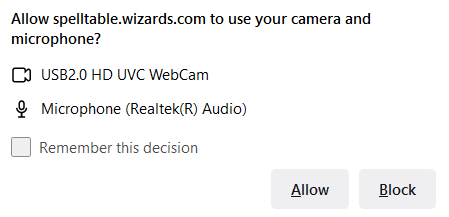
You’ll be prompted to allow the website to access your camera and microphone. I select “Remember this Decision” so that I don’t have to allow access every single time.
#6. Configure Inputs
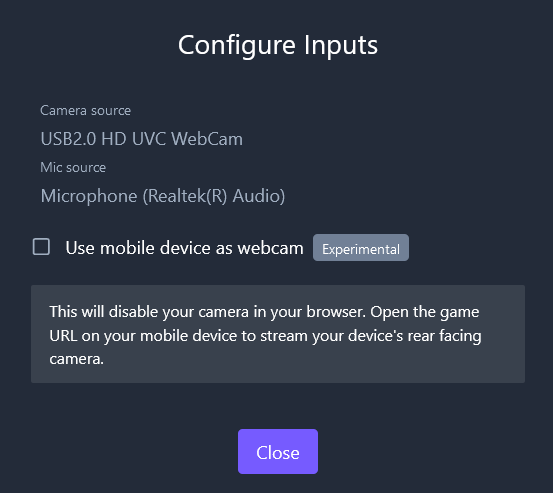
The site also allows you to use your Android or iPhone as a webcam while you have the website up on your desktop. To do this, select the checkbox once prompted and then open up the SpellTable game’s lobby link while logged in on your phone’s web browser. This will automatically turn on your rear facing camera.
How to Set Up SpellTable on Mobile
While you can use your phone to act solely as a camera for SpellTable, you can also set up your phone to do everything all at once. I’ll show you how it’s done on an Android phone, but the process should be identical on an iPhone just in a different browser.
#1. Go to SpellTable
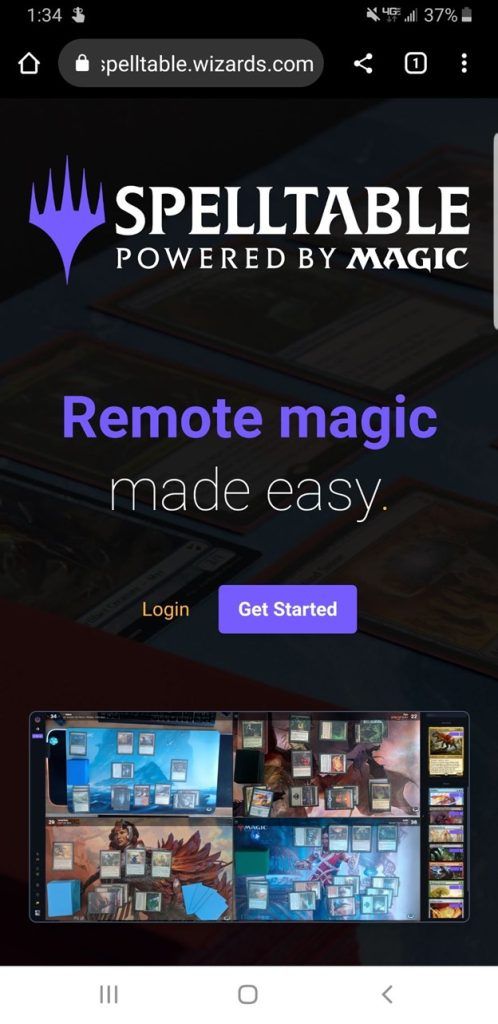
Head over to the SpellTable site.
#2. Log in With Your Wizards Account
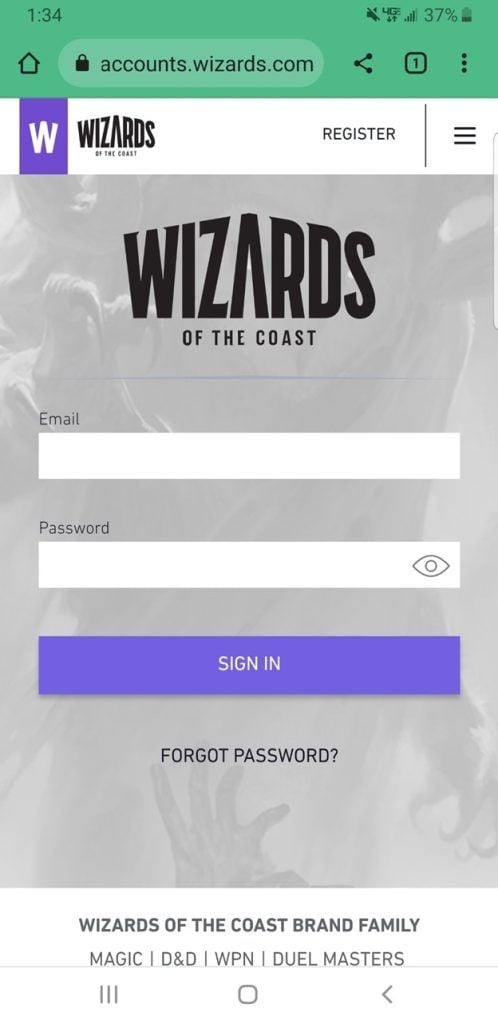
Log in to your Wizards of the Coast account.
#3. Create a Game
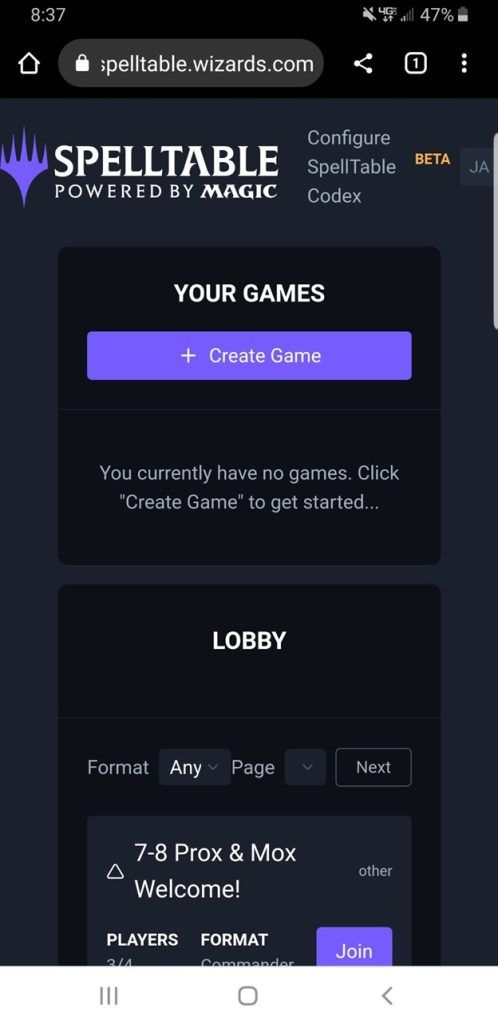
Tap “Create Game” or join one from the lobby.
#4. Fill in Game Details
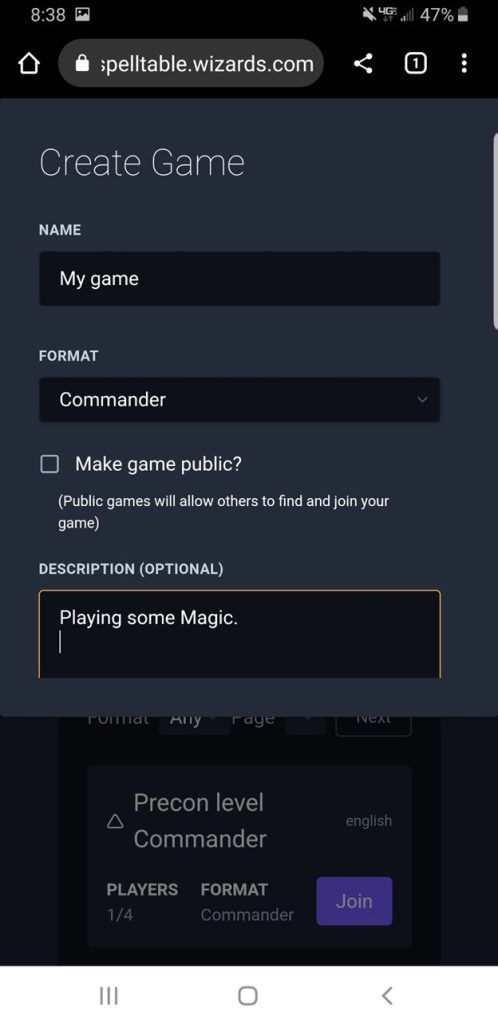
Fill in the details for your lobby, describe the type of game you will play. Choose the format in a separate drop-down menu, and you should address the parameters. Do you allow proxies? Is Everyone Using Commander Precons? What Commander bracket does your deck fit in? Are you doing Discord chat? These are helpful details.
#5. Allow Camera and Microphone Access
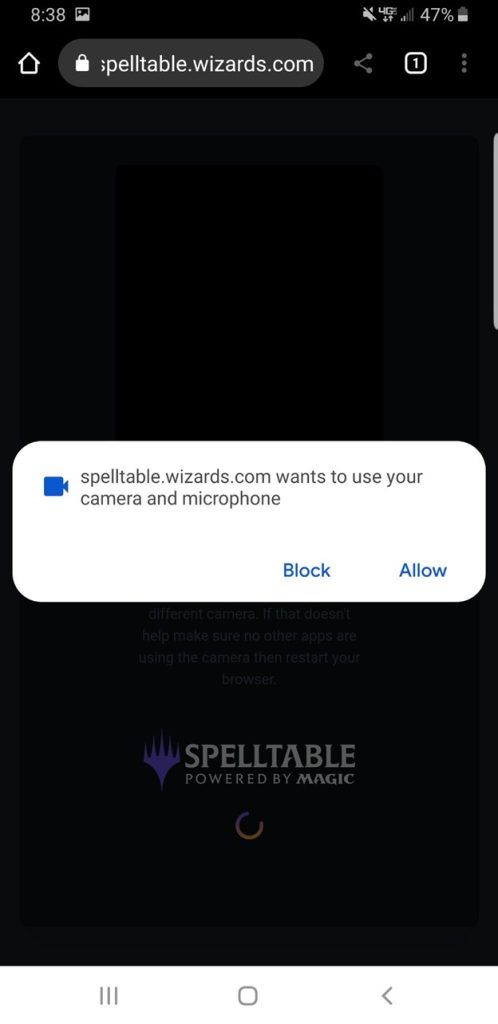
Allow your browser access to your phone’s microphone and camera.
#6. Join a Game

Press “Join” or head to the lobby and look for games with open slots.
How to Get Your Lighting Right
Lighting can often be one of the more frustrating issues when it comes to webcam-based play. I’ve learned that having natural light coming from the side, often from a window, produces the most glare on your card sleeves.
Unless you get beautifully diffused light from your windows, I recommend you close any blinds or curtains you have and rely on a central light above your cards, like a ceiling light or lamp. Direct light can produce less glare. Adjust your light to eliminate as much shadow as you can. Small tweaks of your lights and camera will often significantly reduce lighting issues.
How to Join a Game

A sample of the SpellTable lobby on a weekday afternoon. Find one in your language.
All you need to join a game is the link to a SpellTable lobby. It’s a unique link similar to a Discord invite that automatically joins whatever game it connects you to when you open it.
What if Your Phone Camera Isn’t Working?
If your mobile device gives you an error saying that your camera “is not being recognized” then it’s almost always a fault on the browser. Your browser (or SpellTable specifically) probably doesn’t have access to your camera. Change this in your web browser’s settings or reset your cache and allow it access when prompted.
What if You Get a Black Screen in SpellTable?
The black screen on SpellTable is almost definitely a result of no input being detected. Whether it isn’t plugged in, or your browser doesn’t have permission to access it.
It might be the fault of the browser incorrectly displaying the video if you’re certain that your camera has permission and is working properly otherwise. Restart your browser completely to resolve that issue if that is the case.
Can SpellTable Have More Than 4 Players?
SpellTable allows a maximum of four players in a pod. There isn’t any news about upcoming raises to the player cap, but you have one option if you’re dead set on having an EDH game with five or more players: have the fifth player join a Discord call and turn on their webcam there. Just like having the fifth player on the end of the table, they’ll just be in another window on your computer.
Can You Spectate in SpellTable?

SpellTable allows you to spectate games by adding a certain string to the end of the game-specific link.

Just add “/?spectate=true” without quotation marks to the end of any SpellTable game link and you’ll be able to join as a spectator. This can be very useful when you try to play games with more than four players.
Is SpellTable Only for Commander?

Commander's Sphere (Forgotten Realms Commander) | Illustration by Cliff Childs
SpellTable can be used for any format as long as it doesn’t require more than four players. Most of the games in the lobby are variety of EDH, but there's a lot to choose from when you create your own.
Get your friends ready for Modern 1v1’s or 4-player Standard pods, you can do it all since SpellTable connects you to players and tracks life totals. The platform doesn’t do anything else that would otherwise impede gameplay.
Can You Change Your Name on SpellTable?
No, you can’t change your name on SpellTable. There isn’t a way to access your account settings in any way, so make sure your name is the one you want when you create your account!
Is a SpellTable Setup Worth Investing In?
If you need to play Magic remotely, yes, the equipment needed to show your board on SpellTable is worth investing in. Chances are you already items you have around your home to make your setup work. Upgrades in tripods, camera and lighting can cost less than $100 and be very helpful.
Is SpellTable Owned By Wizards?
SpellTable is owned and operated by Wizards of the Coast. Jonathan Rowny and his team created it at a time of booming video calls as a way to play paper Magic remotely.
Are There Other Ways to Play Magic Remotely?
While there are other alternatives, for me, SpellTable is the easiest way to play paper Magic remotely. Tabletop Simulator is a paid alternative that allows you to play any tabletop game in virtual reality and could be a decent alternative if you look to share a virtual space with the people you play with.
Table Stream is a free alternative that allows for up to 6 players with lots of game state tracking ability and in-game capability. It's quick to create a game and easy to share with your playgroup. There's a Table Stream Discord for support and no account needed.
Lastly, you could join a group Discord call and turn on your webcams to simulate SpellTable if you can’t get it to work for whatever reason. You won’t have the life trackers or ability to identify cards as easily, but it works as an alternative.
Wrap Up

Final Payment | Illustration by Victor Adame Minguez
With that, we’ve gone over just about everything you need to get started playing some remote Magic! I think SpellTable is an excellent tool, and it definitely allowed me to play far more paper Magic with my actual physical cards instead of spending more hours grinding Arena events.
What do you think of SpellTable? Do you think it’s a strong alternative, or are you into MTGO? I want to hear your thoughts, so let me know what you think down in the comments or over on Draftsim’s Twitter.
Until next time, stay safe and stay healthy!
Note: this post contains affiliate links. If you use these links to make a purchase, you’ll help Draftsim continue to provide awesome free articles and apps.
Follow Draftsim for awesome articles and set updates:










Add Comment