
Last updated on June 17, 2025

Ft. Illustration – AT screenshot by Pedro Furtado
When we log into MTG Arena, we get access to lots of information, like how much gold, gems, and wildcards we have, our active Daily Quests and rewards, and which events are currently available on Arena. But interestingly, MTGA designers opted to keep your win rate hidden inside the client.
For more casual players learning to play, it can be discouraging to know that your win rate is in the 30 or 40% range. But it’s a nice metric to know, especially if you’re aiming to get better – or you know, just to brag. Today we’re showing you how to get this information out of your client, the hard way and the easy way – using Arena Tutor, of course.
Let’s go!
What Is Win Rate in MTG Arena?

Briarbridge Tracker | Illustration by Mathias Kollros
Your win rate is the percentage of played games you win. To calculate this, you’ll divide the games you win by the games you’ve played. If you have a 50% win rate, that means you win one game for every two you play.
Unfortunately, we do not usually keep an account of our wins and losses, although some Draft and Sealed players keep a spreadsheet to analyze their card choices. MTG Arena doesn’t show your win rate outright on your profile or something like that, so we need some extra steps to uncover our win rate.
How to Find Your Win Rate Manually
The first means of acquiring player data from MTG Arena used to be uncovering the player log that the game creates as you play, and from there looking through the egregiously massive wall of text to find your win ratio. This was originally accomplished by flipping through some folders, which was pretty easy. The directory would’ve looked something like:
c/users/(username)/appdata/locallow/wizards of the coast/mtga/output_log.txt
Once you had that open, it was a matter of searching for the words “constructed” or “limited” and looking around there to find your games won and lost. This method has slightly changed, so let’s go over it:
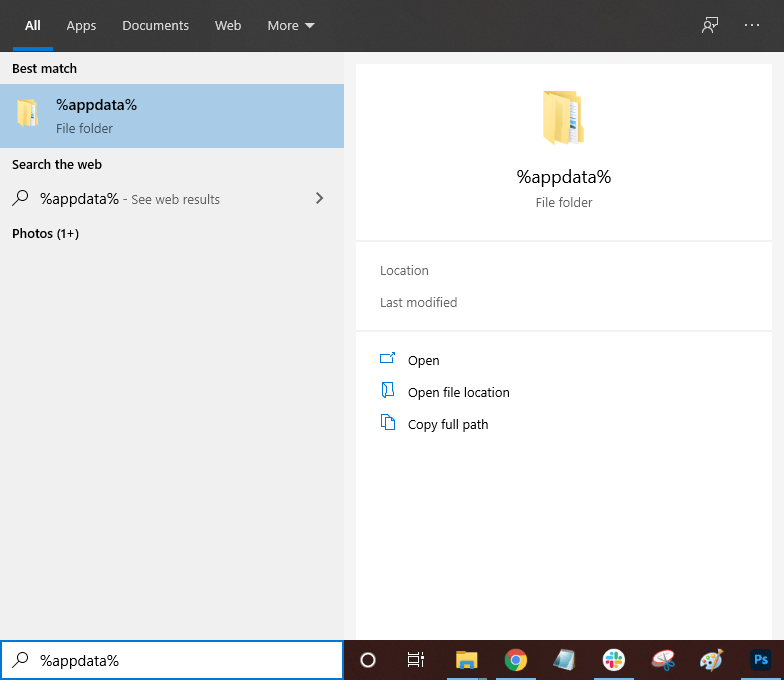
#1. Search for AppData
Type %appdata% in your file explorer to open the AppData/Roaming file path:
#2. Open AppData Folder
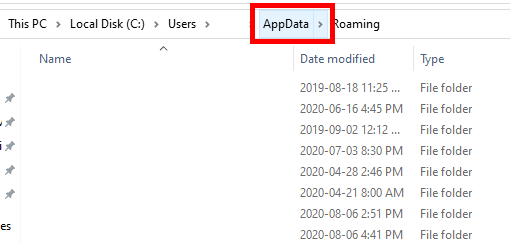
Click on the “AppData” folder in the file path bar at the top:
#3. Open LocalLow Folder
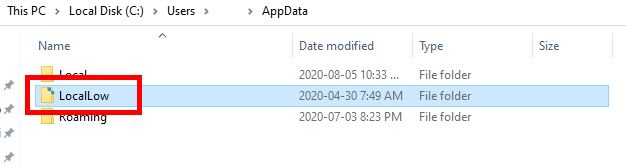
Open the “LocalLow” folder
#4. Open Wizards of the Coast
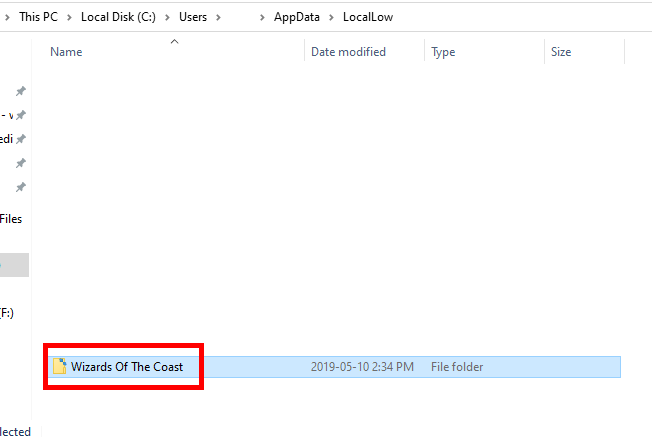
Find and open the “Wizards of the Coast” folder
#5. Open MTG Arena Folder
Open the “MTGA” folder:

#6. Open Player.log Text File
Open the “Player” or “Player.log” text file:

#7. Find Matches Won and Loss
Press “Ctrl + F” and search “MatchesWon” or “MatchesLost” to find your wins and losses for Constructed or Limited.

These stats belong to our editor, I swear!
Now, that can be a lot of text to sift through, and you still need to calculate your percentage. It is a hassle to do this process every time you want to see your games won and lost. Thankfully, there’s more than one way to verb a noun. Let’s take a peek at a much easier way to find what you’re looking for.
The Easy Way to Find Your Win Rate
And then, there’s Draftsim’s own Arena Tutor. Arena Tutor is the quickest and easiest way to get your win rate and other hidden information on MTG Arena, like your Vault Progression and Collection Tracker. So, how do I get to my win rate?
#1. Install and Open Arena Tutor

First, install Arena Tutor, it’s quick and free. Now I’ll show you some neat stuff that Arena Tutor has tracked for me.
#2. Go to Your Profile

Simple and easy, this is my profile shown on Arena Tutor. You can tell I haven’t been drafting that much recently. I usually go 4-3 or 3-3 in drafts, so my win percentage when drafting on Arena is a little lower than that. But it’s okay for Constructed at 64%.
More Match Stats

Here’s a little record of some matches in my MTG Arena account. As you can see, I’m at a 54% win rate – mostly Standard games and ranked Standard games. Arena Tutor shows different data between games and matches to better differentiate Best-of-One and Best-of-Three. On the left side, note that I can further adjust the data I want either by event or format to get more detailed results.

Here are my most recent matches and my record.

Here’s something cool. Your decks are registered by win rate, in each format you choose to see. So you can see Standard records, Draft records, or what have you. Play enough Limited and Arena Tutor tells you which cards are winning more, and which of your Constructed decks have a better win %.
What Is a Good Win Rate in MTG Arena?

As you can see from Arena Tutor data, decks at the top of the current meta have a 58% win rate. Arena Tutor can help you quickly build these to test on Arena, too.
MTG is a game of variance, and not even the pro players win more than 65-70% of their games. The best decks in the metagame usually have a 55-60% win rate overall. Think about this. In Best-of-One (BO1) sometimes you’ll go first, and sometimes you’ll be on the draw, so that already skews win rates, both in Limited and Constructed.
If you have a 50-55% win rate in Limited, you’ll get a lot of mileage out of your Drafts. With a 60% win percentage, you can nearly go infinite in drafts. You’ll require around 65% win rate in Best-of-Three (BO3) and 70% win rate in BO1 to go infinite (which means you can enter another draft with what you’ve earned in the previous one).
How Does Win Rate Work For My Ranking?
If you play ranked Constructed or Limited on MTG Arena, a win means you progress in the ranks, and you take a step back when you lose. For bronze, silver, and gold, when you win, you advance two steps, and when you lose, you go back one step, except in Bronze in which you don’t lose your ranking. Here, a 50% win rate will make you advance slowly but steadily. From Platinum on, if you win, you climb one step, and if you lose, you go down one step, so clearly the 50% win rate doesn’t cut it anymore. To progress quickly (the ranks reset at the start of the month) and get to mythic on Arena, a 60-65% win rate is desirable.
It’s not clear exactly how the matchmaking system works, but once you get to a high win rate, you’re paired with players who also have a high win rate, thus making the challenge more difficult. The top mythic ranked players usually have a win rate around 60-70% at the highest competition level, so that’s what you should strive for if that’s your goal.
Wrap Up

Victory's Envoy | Illustration by Sara Winters
And there you have it! Finding your MTG Arena match record should be a cakewalk from here on out, especially if you’re making use of Arena Tutor #notnotsponsored. Or maybe you already have another method of locating your stats? If so, or if you have any other questions, feel free to take to the comments!
As always, if you’re looking for more content from us head over to our blog where we have tons of articles for you to read up on. If you want to show your support, don’t be afraid to drop by our Patreon page.
One last reminder: Get. Our. MTGA. Assistant. Arena Tutor. It’s free and you have nothing to lose.
Thank you for reading, and we hope to see you in the next article!
Follow Draftsim for awesome articles and set updates:










6 Comments
I see this was just posted 4 days ago, but does checking the log files still work? In my MTGA folder, all I see are output_log.txt, Player.log, and Player-prev.log, and can’t find anything matching search terms “constructed”, “lost”, “win”… ??
Guess I’ll have to try the Arena Tool..
You definitely should give Arena Tutor a try. But to get this method to work, or AT to work, you have to have detailed logging enabled. Give the steps in that article a try and then let me know if that fixes it.
I looked through this and tested it, it seems detailed logging is only keeping track of ranked wins/losses. Does Arena Tutor also only tracked ranked?
Nope, it tracks everything! Any non-bot match. See here: https://prnt.sc/fqwdhy63PpUb
If you’re still having issues, feel free to reach out here and I can get more details from you:
https://draftsim.com/arenatutor/how-to-report-a-bug/
Does this work if we are playing on PC or mobile apps only? Thanks
If you’re asking about Arena Tutor, yes it’s available for PC. Currently Windows only.
Add Comment